Working with External Filters in AG Grid
At work today, I learned about how to add external filters to an AG grid table.
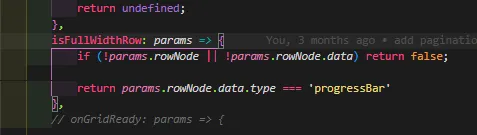
Our users had requested a way to toggle the visibility of full-width rows on certain tables. Initially, I thought this could be achieved by returning 'false' in the isFullWidthRow grid option function. However, I quickly realized that this approach only removed the fullWidthCellRenderer and left a normal row behind.
After a bit of digging through Stack Overflow and the AG Grid docs, I found exactly what I was looking for: external filters. As defined by AG Grid, "external filtering allows you to mix your own filtering logic with the grid's inbuilt filtering, without creating column-based filter components." Essentially, I can create row filters, which is exactly what I need. Note: external filters are only available on tables that use the client-side row model.
My filtering logic is very simple: I want to hide any row that is a full-width row. To do this, I'll use the same comparator that is used in isFullWidthRow to filter out full-width rows.
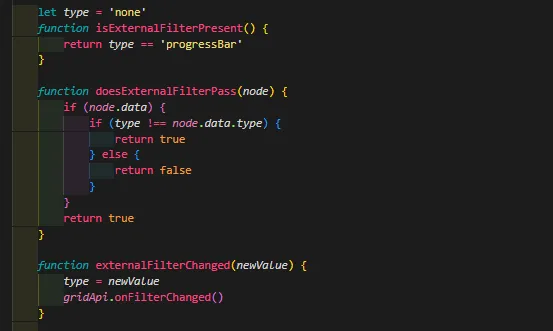
After this, I pretty much follow the example given in the AG Grid docs to add the filtering logic. I created two functions that share the same name as the required grid options, isExternalFilterPresent and doesExternalFilterPass, and I save the default 'type' state as a 'let' variable. These functions check the current row type against the filter value, i.e. they are the filters. The other function I wrote was externalFilterChanged. This function updates the 'type' variable with the filter value and calls the gridApi function onFilterChanged to redraw the rows. Finally, I call the eponymous functions on their respective grid options.
Now that the JavaScript mechanism is written, all that's left is to hook it up to the filter controls. In this feature, we're using a toggle button. The toggle button is a relatively new pattern in our codebase. It's interesting to see how it's applied in different contexts. You can play around with the prototype I made on codepen.
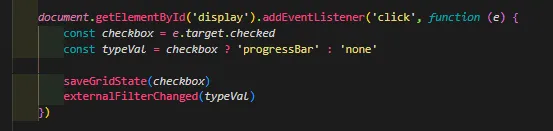
To get everything working, I add an event listener on click to the toggle. Since the toggle is actually a checkbox, I use the checked attribute, which is a boolean, to determine the filter value. Then, I call externalFilterChanged with the filter value and, voila! A working external filter on a toggle.
With that, another ticket ends on a very satisfying conclusion